

Fiat Punto: Windscreen washer/wiper
Fiat Punto Owners Manual
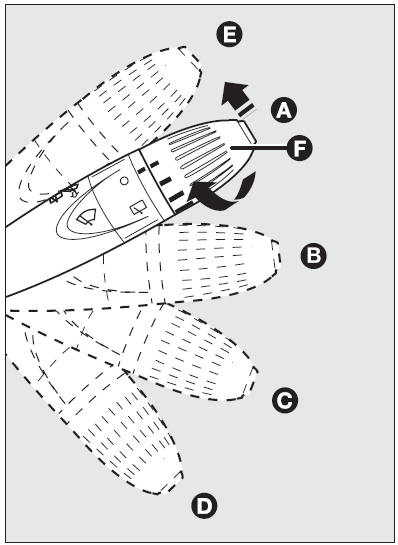
This device can only work when the ignition key is at MAR.
The stalk can be moved to five different positions:
- windscreen wiper off
- flick wipe: on certain versions, turning the knurled ring (F), four possible intermittent speeds are obtained (slowest to fastest).
With the stalk in position (B), turning the knurled ring (F), four possible intermittent speeds are obtained:
■ = very slow intermittent ■■ = slow intermittent ■■■ = intermittent medium ■■■■ = fast intermittent
- continuous slow;
- continuous fast;
- fast temporary (unstable position).
Operation in position (E) is limited to the time the lever is held in this position. When the lever is released, it returns to position (A) automatically stopping the wiper.
“Smart washing” function
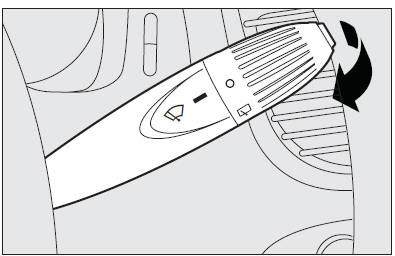
Pulling the stalk towards the steering wheel (unstable position) operates the windscreen washer; indeed, the latter comes into action automatically if the stalk is pulled for more than half a second.
The wiper stops working three strokes after releasing the stalk. On certain versions a further “cleaning stroke”, after a few seconds, completes the wiping operation.
Operating the stalk quickly and repeatedly (for less than half a second) it is possible to wet the windscreen several times without operating the wiper.
 Never use the window Never use the window
wiper to remove ice or snow from the windscreen. In these conditions, the wiper is submitted to excessive effort that results in motor protection cutting in and wiper operation inhibition for few seconds as a consequence. If operation is not restored contact Fiat Dealership. |


Other info:
Chevrolet Sonic. Menu System
Controls
The Push/MENU/TUNE knob, Push/ MENU/TUNE button, and / BACK button are used to
navigate the menu system.
Push/MENU/TUNE Knob:
Turn to:
Enter the menu system.
Highlight a menu optio ...
Chevrolet Sonic. Vehicle Identification Number (VIN)
This legal identifier is in the front corner of the instrument panel, on the
left side of the vehicle. It can be seen through the windshield from outside. The
VIN also appears on the Vehicle C ...
Chevrolet Sonic. Exterior Lighting
The exterior lamp control is on the instrument panel to the outboard side of
the steering column.
O : Briefly turn to this position to turn the automatic light control off or
on again.
AUTO: T ...
Manuals For Car Models
-
 Chevrolet Sonic
 -
 Citroen C3
 -
 Fiat Punto
 -
 Honda Fit
 -
 Mazda 2
 -
 Nissan Micra
 -
 Peugeot 208
 -
 Renault Clio
 -
 Seat Ibiza
 -
 Skoda Fabia
 - Honda Pilot
- Volkswagen ID4
- Toyota Prius
