

Ford Fiesta: MyKey
Ford Fiesta 2009-2019 Owners Manual
Principle of Operation
MyKey allows you to program keys with restricted driving modes to promote good driving habits. All but one of the keys programmed to the vehicle can be activated with these restricted modes.
Any keys that have not been programmed are referred to as administrator keys or admin keys. These can be used to:
- Create a MyKey
- Program configurable MyKey settings
- Clear all MyKey features
When you have created a MyKey, you can access the following information using the information display:
- How many admin keys and MyKeys are programmed to your vehicle.
- The total distance your vehicle has traveled using any MyKey.
Note: All MyKeys are programmed to the same settings. You cannot program them individually.
If a MyKey and an admin key are present, your vehicle will recognize the admin key only.
Note: For vehicles with intelligent access key (push button start) keyless start, when both a MyKey and an admin intelligent access key (fob) are present, the admin fob will be recognized by the vehicle to start the engine.
Non-configurable Settings
The following settings cannot be changed by an admin key user:
- Belt-minder. You cannot disable this feature. The audio system will mute when the safety belts are not fastened.
- Early low fuel warning. The low-fuel warning activates earlier, giving the MyKey user more time to refuel.
- Driver assist features, if equipped on your vehicle, are forced on: parking aid, blind spot information system (BLIS) with cross traffic alert, lane departure warning and forward collision warning system.
- Satellite radio adult content restrictions.
Configurable Settings
With an admin key, you can configure certain MyKey settings when you first create a MyKey and before you recycle the key or restart the vehicle. You can also change the settings afterward with an admin key:
- Vehicle speed limits can be set.
Warnings will be shown in the display followed by an audible tone when your vehicle reaches the set speed. You cannot override the set speed by fully depressing the accelerator pedal.
- Vehicle speed minders of 45, 55 or 65 mph (75, 90 or 105 km/h). Once you select a speed it will be shown in the display followed by an audible tone when the set vehicle speed is exceeded.
- Audio system maximum volume of 45%. A message will be shown in the display when you attempt to exceed the limited volume. Also, the speed sensitive compensated volume (automatic volume control) feature will be disabled.
- Always on setting. When this is selected you will not be able to disable AdvanceTrac, 911 Assist or the do not disturb feature (if your vehicle is equipped with these features).
Creating a MyKey
Use the information display to create a MyKey.
1. Insert the key you want to program into the ignition or, if the vehicle has push button start, hold the intelligent access key or fob next to the steering column.
2. Using the information display controls, access the main menu and select Settings, then MyKey by pressing OK or the right arrow button.
3. Press OK to select Create MyKey.
4. When prompted, hold the OK button until you see a message informing you to label this key as a MyKey. The key will be restricted at the next start.
MyKey is successfully created. Make sure you label it so you can distinguish it from the admin keys.
You can program configurable settings for the key(s). Refer to Programming or Changing Configurable Settings.
Programming or Changing Configurable Settings
Use the information display to access your configurable MyKey settings.
1. Switch the ignition on using an admin key. If the vehicle has push-button start, hold an intelligent access admin key or fob next to the steering column and use the push-button start to switch the ignition on.
2. Access the main menu and select Settings, then MyKey by pressing OK or the right arrow key.
3. Use the arrow buttons to get to a configurable feature.
4. Press OK or the right arrow button to make a selection.
Note: You can clear or change your MyKey settings at any time during the same key cycle as you created the MyKey. If you switch the ignition off, however, you will need to use an admin key to clear your MyKeys.
Clearing All MyKeys
You can clear all MyKeys within the same key cycle as you created the MyKey. If you switch your ignition off, however, you will need to use an admin key to clear your MyKeys.
Note: When you clear your MyKeys, you remove all restrictions and return all MyKeys to their original admin key status at once.
To clear all MyKeys of all MyKey settings, use the information display to do the following:
1. Access the main menu and select Settings, then MyKey.
2. Scroll to Clear MyKey and press the OK button.
3. Hold the OK button until ALL MYKEYS CLEARED displays.
Checking MyKey System Status
You can find information about your programmed MyKeys by using the information display.
MyKey Distance
Tracks the distance when drivers use a MyKey. The only way to delete the accumulated distance is by using an admin key to clear your MyKey. If the distance does not accumulate as expected, then the intended user is not using the MyKey, or an admin key user recently cleared and then recreated a MyKey.
Number of MyKeys
Indicates the number of MyKeys programmed to your vehicle. Use this feature to detect how many MyKeys you have for your vehicle and determine when a MyKey has been deleted.
Number of Admin Keys
Indicates how many admin keys are programmed to your vehicle. Use this feature to determine how many admin keys you have for your vehicle, and detect if an additional MyKey has been programmed.
Using MyKey With Remote Start Systems
MyKey is not compatible with non-Ford-approved aftermarket remote start systems. If you choose to install a remote start system, please see an authorized dealer for a Ford-approved remote start system.
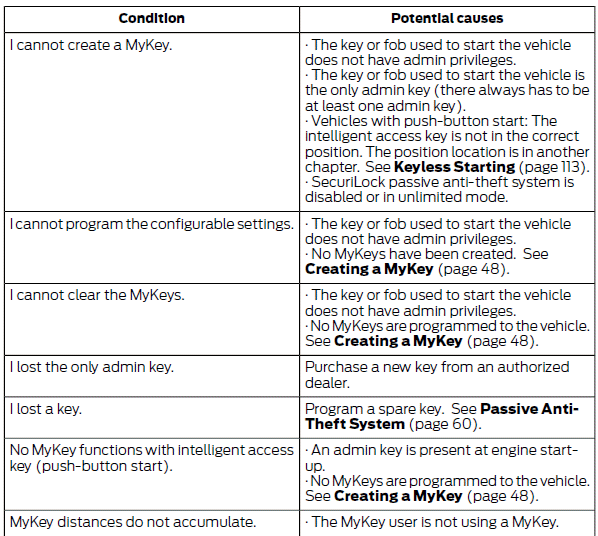
MyKey Troubleshooting



Other info:
Peugeot 208. Wipers
Control stalk A: windscreen wipers
2. Fast wipe.
1. Normal wipe.
Int. Intermittent wipe.
0. Park.
AUTO Automatic wiping.
Single wipe: Brief pull on the stalk
towards. Screenwash: Long pull ...
Seat Ibiza. Roof aerial
The vehicle may be fitted with a collapsible roof aerial* with antitheft system*,
which can be folded backwards, when, for example, going through an automatic carwash.
To fold
Unscrew the aerial r ...
Peugeot 208. Operating fault
In the event of a cruise control malfunction, the speed is cleared resulting
in flashing of the dashes. Have it checked by a PEUGEOT dealer or a qualified workshop.
When the cruise control is swi ...
Manuals For Car Models
-
 Chevrolet Sonic
 -
 Citroen C3
 -
 Fiat Punto
 -
 Honda Fit
 -
 Mazda 2
 -
 Nissan Micra
 -
 Peugeot 208
 -
 Renault Clio
 -
 Seat Ibiza
 -
 Skoda Fabia
 - Honda Pilot
- Volkswagen ID4
- Toyota Prius
