
Mazda 2: Drive Selection
Mazda2 Owners Manual
Drive selection is a system to switch the vehicle's drive mode. When the sport mode is selected, vehicle's response against accelerator operation is enhanced. Use the sport mode when higher vehicle response is required such as merging onto expressway or accelerating to overtake.
CAUTION
Do not use the sport mode when driving on slippery roads such as wet or snow-covered roads. It may cause tyre slipping.
NOTE
When the sport mode is selected, driving at higher engine speeds increases and it may increase fuel consumption. Mazda recommends to cancel the sport mode on normal driving.
Drive mode cannot be switched in the following conditions:
- ABS/TCS/DSC is operating
- Steering wheel is being operated abruptly
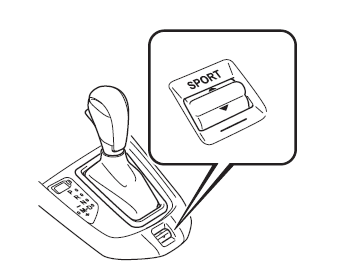
Drive Selection Switch
Press the drive selection switch to the

side (forward) to select the sport
mode.
Pull the drive selection switch to the side (backward) to cancel the sport mode.
NOTE
- When the ignition is switched off, the sport mode is cancelled.
- Depending on the driving conditions when sport mode is selected, the vehicle may perform shift-down or slightly accelerate.
Select Mode Indicator Light
When the sport mode is selected, the
select mode indicator light turns on in the
instrument cluster. 
NOTE
If the mode cannot be switched to drive mode, the select mode indicator light fl ashes to notify the driver.


Other info:
Honda Fit. Safety of Larger Children
WARNING
Allowing a child age 12 or under to sit in
front can result in injury or death if the
passenger’s front airbag inflates.
If a larger child must ride in front, move the
vehicle seat as ...
Chevrolet Sonic. Traction Control System (TCS)/StabiliTrak® Light
The StabiliTrak or Traction Control System (TCS) indicator/warning light comes
on briefly when the engine is started.
If the light does not come on, have the vehicle serviced by your dealer. If t ...
Citroen C3. Steering wheel adjustment
The height and reach of the steering
wheel can be adjusted to adapt the driving
position to the size of the driver.
Adjustment
When stationary , pull the control to
unlock the steering w ...
Manuals For Car Models
-
 Chevrolet Sonic
 -
 Citroen C3
 -
 Fiat Punto
 -
 Honda Fit
 -
 Mazda 2
 -
 Nissan Micra
 -
 Peugeot 208
 -
 Renault Clio
 -
 Seat Ibiza
 -
 Skoda Fabia
 - Honda Pilot
- Volkswagen ID4
- Toyota Prius
