
Mazda 2: Front Fog Lights
Mazda2 Owners Manual
Can be used when the ignition is switched ON.
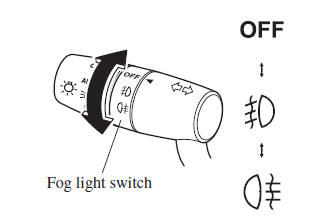
Use this switch to turn on the front fog lights. The front fog lights will improve visibility at night and during foggy conditions.
To turn the front fog lights on, rotate the
fog light switch to the  or
or
 position
(the fog light switch returns to the 
position automatically).
The headlight switch must be in the
 or
or

position before turning on the front fog
lights.
The front fog light indicator light in the
instrument cluster illuminates while the
front fog light are on. 
To turn the front fog lights off, do any of the following:
- Rotate the fog light switch to the position.
- Turn the headlight switch to the position.
- Switch the ignition to a position other than ON.
NOTE
- (With auto-light control)
If the fog light switch is in the
 or
or
 position and the headlight
switch is in the position, the
front fog lights will turn on when the headlights, the exterior lights and instrument panel illumination turn on. - If the fog light switch is rotated to
the
 position (the fog light
switch returns to the position
automatically), the rear fog light will also illuminate, and the rear fog light indicator light in the instrument cluster will also illuminate.


Other info:
Honda Fit. Immobilizer System
The immobilizer system prevents a key that has not been pre-registered from
starting the engine. Each key contains electronic transmitters that use
electronic
signals to verify the key.
Pay att ...
Fiat Punto. Bodywork
PROTECTION FROM ATMOSPHERIC
AGENTS
The main causes of corrosion are the following:
atmospheric pollution;
salty air and humidity (coastal areas, or hot humid
climates);
seasonal environmen ...
Skoda Fabia. Engine compartment
WARNING
When working in the engine compartment, injuries, scalding, accident
or
fire hazards may arise. For this reason, it is essential to comply with the
warning instructions stated below and w ...
Manuals For Car Models
-
 Chevrolet Sonic
 -
 Citroen C3
 -
 Fiat Punto
 -
 Honda Fit
 -
 Mazda 2
 -
 Nissan Micra
 -
 Peugeot 208
 -
 Renault Clio
 -
 Seat Ibiza
 -
 Skoda Fabia
 - Honda Pilot
- Volkswagen ID4
- Toyota Prius
