
Nissan Micra: Controls
Nissan Micra Owners Manual
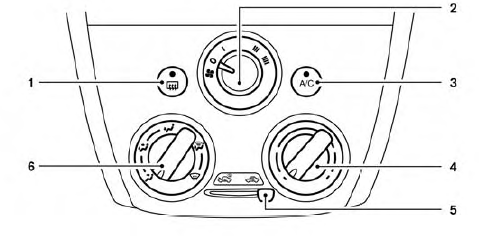
- Rear window and outside mirror (if so equipped) defroster switch
- Fan speed control dial
- A/C (air conditioner) button
- Temperature control dial
- Air intake lever (Air recirculation and Fresh air)
- Air flow control dial
Fan control dial
The fan control dial turns the fan on and off and controls fan speed.
Air flow control dial
The air flow control dial allows you to select the air flow outlets.
 Air flows from center
and side vents. Air flows from center and
side vents and foot outlets. Air flows mainly from foot
outlets. Air flows from defroster
outlets and foot outlets. Air flows mainly from
defroster outlets.
Temperature control dial
The temperature control dial allows you to adjust the temperature of the outlet air. To lower the temperature, turn the dial to the left. To increase the temperature, turn the dial to the right.
Fresh air
Move the air intake lever to the  position.
The air flow is drawn from outside the vehicle.
Air recirculation
Move the air intake lever to the 
position to
recirculate air inside the vehicle.
Use the  selection:
- when driving on a dusty road.
- to prevent traffic fumes from entering passenger compartment.
- for maximum cooling when using the air conditioner.
 Air conditioner button
Start the engine, turn the fan control dial to the
desired position and press the 
button to
turn on the air conditioner. The indicator light
comes on when the air conditioner is operating.
To turn off the air conditioner, press the

button again.
The air conditioner cooling function operates only when the engine is running.
Rear window and outside mirror (if so equipped) defroster switch
For additional information, refer to “Rear window and outside mirror (if so equipped) defroster switch” in the “Instruments and controls” section of this manual


Other info:
Nissan Micra. Switch operation
Type A (if so equipped)
The windshield wiper and washer operates when
the ignition switch is in the ON position.
Push the lever down to operate the wiper at the
following speed:
Intermit ...
Peugeot 208. Repair procedure
1. Sealing
Switch off the ignition.
Turn the selector A to the "sealant" position.
Check that the switch B is in position "O".
Avoid removing any foreign bodies whic ...
Nissan Micra. Fog lights (if so equipped)
If replacement is required, see a NISSAN dealer.
CAUTION
High pressure halogen gas is sealed
inside the halogen bulb. The bulb may
break if the glass envelope is scratched
or t ...
Manuals For Car Models
-
 Chevrolet Sonic
 -
 Citroen C3
 -
 Fiat Punto
 -
 Honda Fit
 -
 Mazda 2
 -
 Nissan Micra
 -
 Peugeot 208
 -
 Renault Clio
 -
 Seat Ibiza
 -
 Skoda Fabia
 - Honda Pilot
- Volkswagen ID4
- Toyota Prius
