
Nissan Micra: Headlight control switch
Nissan Micra Owners Manual
Lighting
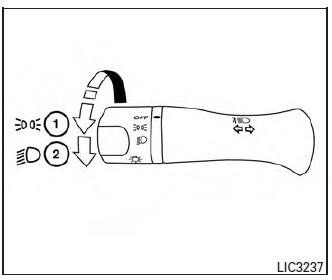
- Rotate the switch to the
 position, and
the front parking, tail, license plate, and instrument panel lights will come on. - Rotate the switch to the

position, and the headlights will come on and all the other lights remain on.
| CAUTION Use the headlights with the engine running to avoid discharging the vehicle battery. |
Headlight beam select
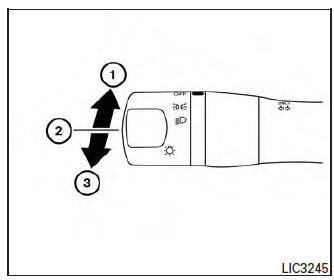
- To select the high beam function, engage the
low beams, then push the lever forward. The
high beam lights come on and the

indicator light illuminates (blue). For additional information, refer to “Headlight control switch” in this section. - Pull the lever back to return to the low beams.
- Pulling and releasing the lever flashes the headlight high beams on and off. The low beams need not be on for this function.
Battery saver system
If the ignition switch is placed in the OFF position
while the headlight switch is in the 
or  position, the headlights will
turn off after
a period of time.
| CAUTION Even though the battery saver feature automatically turns off the headlights after a period of time, you should turn the headlight switch to the OFF position when the engine is not running to avoid discharging the vehicle battery. |


Other info:
Chevrolet Sonic. Driving on Snow or Ice
Drive carefully when there is snow or ice between the tires and the road, creating
less traction or grip.
Wet ice can occur at about 0°C (32°F) when freezing rain begins to fall, resulting
in e ...
Seat Ibiza. Windscreen washers
Front windscreen wipers
The windscreen wiper lever controls the windscreen wipers and the automatic wash
and wipe.
Fig. 66 Windscreen wiper and windscreen wash lever
The windscreen wipe ...
Seat Ibiza. Petrol
Petrol types
The correct petrol types are listed on a sticker inside the fuel tank flap. Only
unleaded petrol, corresponding to the standard DIN EN 228, may be used for vehicles
with catalytic co ...
Manuals For Car Models
-
 Chevrolet Sonic
 -
 Citroen C3
 -
 Fiat Punto
 -
 Honda Fit
 -
 Mazda 2
 -
 Nissan Micra
 -
 Peugeot 208
 -
 Renault Clio
 -
 Seat Ibiza
 -
 Skoda Fabia
 - Honda Pilot
- Volkswagen ID4
- Toyota Prius
