

Nissan Micra: How to read the displayed lines
Nissan Micra Owners Manual
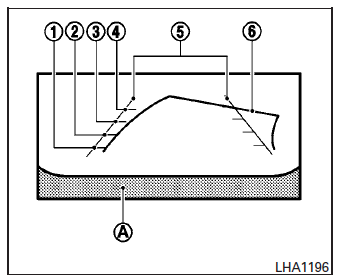
Guiding lines which indicate the vehicle width and distances to objects with reference to the vehicle body line A are displayed on the monitor.
Distance guide lines
Indicate distances from the vehicle body.
- Red line 1 : approx. 1.5 ft (0.5 m)
- Yellow line 2 : approx. 3 ft (1 m)
- Green line 3 : approx. 7 ft (2 m)
- Green line 4 : approx. 10 ft (3 m)
Vehicle width guide lines 5
Indicate the vehicle width when backing up.
Predicted course lines 6
Indicate the predicted course when backing up.
The predicted course lines will be displayed on the monitor when the shift lever is in the R (Reverse) position and the steering wheel is turned.
The predicted course lines will move depending on how much the steering wheel is turned and will not be displayed while the steering wheel is in the straight-ahead position.
The vehicle width guide lines and the width of the predicted course lines are wider than the actual width and course.


Other info:
Peugeot 208. Moving off
Select position N.
Press the brake pedal down fully.
Start the engine.
N appears in the instrument panel
screen.
N flashes in the instrument panel, accompanied by an audible signal and a ...
Chevrolet Sonic. Remote Keyless Entry (RKE) System
The RKE transmitter may work up to 60m (195 ft) away from the vehicle.
The RKE transmitter can have one of the two symbols for the remote trunk release.
With Remote Start Shown
Press the key ...
Renault Clio. Indicator lights (changing bulbs)
Courtesy light
Unclip the lens 1 (using a flat-bladed
screwdriver or similar).
Remove the bulb concerned.
Bulb type: W5W.
Luggage compartment light
Unclip the light 2 by pressing the ...
Manuals For Car Models
-
 Chevrolet Sonic
 -
 Citroen C3
 -
 Fiat Punto
 -
 Honda Fit
 -
 Mazda 2
 -
 Nissan Micra
 -
 Peugeot 208
 -
 Renault Clio
 -
 Seat Ibiza
 -
 Skoda Fabia
 - Honda Pilot
- Volkswagen ID4
- Toyota Prius
