
Peugeot 208: Information display
Peugeot 208 Owners Manual
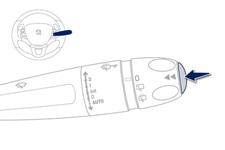
Press the button on the end of the wiper control stalk to display the various tabs in succession.
- The current information tab with:
● the range,
● the current fuel consumption,
● the Stop & Start time counter.

- Trip "1" with: ● the average speed.
● the average fuel consumption, ● the distance travelled, for the first trip.
 - Trip "2" with:
● the average speed,
● the average fuel consumption,
● the distance travelled, for the second trip.


Other info:
Skoda Fabia. Multifunction display (MFD)
The multifunction display can only be operated when the ignition is switched
on. After the ignition is switched on, the function displayed is the one which
you last selected before switching off the ...
Fiat Punto. General
The fuse is a protective device for the electric system: it comes into
action (i.e. it cuts off) mainly due to a fault or improper action on the
system.
When a device does not work, check the ...
Honda Fit. Authorized Manuals
■ Service Express
For electronic copies of service publications, you can purchase a subscription
to
Service Express. Visit www.techinfo.honda.com for pricing and options.
■ For U.S. O ...
Manuals For Car Models
-
 Chevrolet Sonic
 -
 Citroen C3
 -
 Fiat Punto
 -
 Honda Fit
 -
 Mazda 2
 -
 Nissan Micra
 -
 Peugeot 208
 -
 Renault Clio
 -
 Seat Ibiza
 -
 Skoda Fabia
 - Honda Pilot
- Volkswagen ID4
- Toyota Prius
