

Peugeot 208: Unlocking the vehicle Complete unlocking
Peugeot 208 Owners Manual
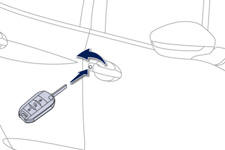
Using the key
Turn the key to the front of the vehicle to unlock the vehicle.
Using the remote control
 Press the open padlock
to unlock the vehicle.
Unlocking is confirmed by rapid flashing of the direction indicators for approximately two seconds. According to version, the door mirrors unfold at the same time.


Other info:
Chevrolet Sonic. Instrument Panel Fuse Block
The instrument panel fuse block is on the underside of the driver side instrument
panel.
The vehicle may not be equipped with all of the fuses, relays, and features shown.
...
Nissan Micra. Exterior front
Engine hood
Windshield
Wiper and washer switch
Antenna
Power windows (if so equipped)
Door locks
Key fob (if so equipped)
Keys
Mirrors
Tire pressure
Flat tire
T ...
Fiat Punto. ESP system
The ESP system is an electronic system controlling the
car stability in the event of tyre grip loss.
The ESP system is therefore particularly useful when
grip conditions of the road surfaces chan ...
Manuals For Car Models
-
 Chevrolet Sonic
 -
 Citroen C3
 -
 Fiat Punto
 -
 Honda Fit
 -
 Mazda 2
 -
 Nissan Micra
 -
 Peugeot 208
 -
 Renault Clio
 -
 Seat Ibiza
 -
 Skoda Fabia
 - Honda Pilot
- Volkswagen ID4
- Toyota Prius
