

Skoda Fabia: Voice control
Skoda Fabia Owners Manual
Dialogue
The period of time during which the system is ready to receive voice commands and to carry them out is called a dialogue. The system gives audible feedback and guides you if necessary through the relevant functions.
Optimum understanding of the voice commands depends on several factors.
- Speak with a normal tone of voice without intonation and excessive pauses.
- Avoid a bad pronunciation.
- Close the doors, windows and sliding roof, to reduce or stop disturbing exterior noise.
- It is recommended to speak louder at higher speeds, so that the tone of your voice is louder than the increased surrounding noise.
- During the dialogue, limit additional noise in the vehicle, e.g. passengers talking at the same time.
- Do not speak, if the system makes an announcement.
The microphone for voice control is inserted in the moulded headliner and directed to the driver and front passenger. Therefore the driver and the front passenger can operate the equipment.
Entering a phone number
The telephone number can be entered as a continuous series of individually spoken digits (the whole number at once) or in the form of digital blocks (separated by short pauses). After each order of digits (separation through brief voice pause) all of the digits detected up to now are repeated by the system.
The digits 0 - 9, symbols +,  , # are
permitted. The system detects no continuous
digit combinations such as twenty-three, but only individually spoken digits
(two, three).
Switching on voice control
- Press the
 button on the
adapter » Fig. 100 on page 96 briefly. - Press the 1 button on the multifunction steering wheel briefly » page 95, Operating the phone on the multifunction steering wheel .
Switching off voice control
If the system is currently playing a message, the message that is currently being played will have to be stopped as follows:
- Press the button on the
adapter briefly - Press the 1 button on the multifunction steering wheel briefly.
If the system is expecting a voice command, you can end the dialogue yourself as follows.
- with the CANCEL voice command.
- Press the
 button on the
adapter. - Press the 1 button on the multifunction steering wheel briefly.
Note
- The dialogue of an incoming call is immediately interrupted.
- The voice control is only possible in vehicles fitted with a multifunction steering wheel with telephone control or a phone mount and adapter.
Voice commands
Basic voice commands
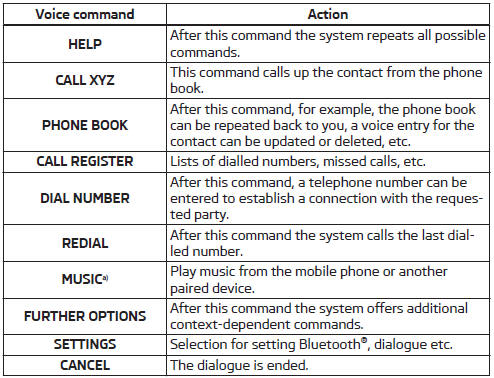
a) On vehicles fitted with the Amundsen+ navigation system, this function can be accessed via the navigation system menu; refer to the » Operating instructions for the Amundsen+ navigation system.
If a voice command is not detected, the system answers with “Sorry?”, and a new attempt can be made. After the 2nd error the system repeats the aid. After the 3rd. failed attempt, the answer “Cancelled” is given and the dialogue is ended.
Store voice recording of a contact
If automatic name recognition does not work reliably for some contacts, you can choose to save your own voice tag for the contact in the Phone book - Voice tag - Record menu item.
Your own voice tag can also be saved using the voice control in the FURTHER OPTIONS menu.


Other info:
Skoda Fabia. Brake assist systems
WARNING
A lack of fuel can cause irregular engine running or cause the
engine to
shut down. The brake assist systems would then be without function –
there is the risk of an accident.
A ...
Chevrolet Sonic. Steering Wheel Controls
Some audio steering wheel controls could differ depending on the vehicle's options.
Some audio controls can be adjusted at the steering wheel.
/
(Push to Talk): For
vehicles with Bluetooth
...
Skoda Fabia. Fuel
The correct grades of fuel for your vehicle are stated on a sticker affixed
to the
inside of the fuel filler flap » Fig. 123 on page 137 - B.
WARNING
The national legal requirements must be obse ...
Manuals For Car Models
-
 Chevrolet Sonic
 -
 Citroen C3
 -
 Fiat Punto
 -
 Honda Fit
 -
 Mazda 2
 -
 Nissan Micra
 -
 Peugeot 208
 -
 Renault Clio
 -
 Seat Ibiza
 -
 Skoda Fabia
 - Honda Pilot
- Volkswagen ID4
- Toyota Prius
