
Fiat Punto: Cellular phone set-up
Fiat Punto Owners Manual
The system set-up, combined with radio consists of:
- dual-purpose aerial (sound system + cellular phone 900/1800 MHz), on the car roof;
- dual-purpose connection wires and ten-pin connector wiring.
The connector is located between the steering column and the central console.
Cellular phone set-up combined with sound system set-up, consists of:
- dual-purpose aerial (sound system + cellular phone 900/1800 MHz), on the car roof;
- dual-purpose speaker (sound system + cellular phone), on passenger’s door;
- dual-purpose connection wires and ten-pin connector wiring.
The connector is located between the steering column and the central console.
 The hands-free The hands-free
telephone you purchase will need to be compatible with your cellular telephone. |
 The maximum power The maximum power
applicable to the aerial is 20W. |
The wiring diagram is the following:
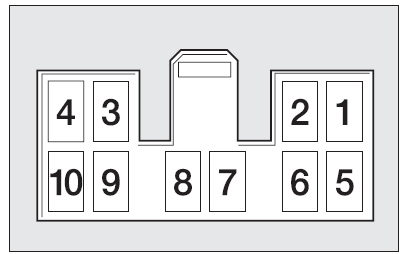
- Sound system MUTE function
- Spare
- Cellular phone INPUT earth signal (*)
- Cellular phone INPUT signal (*)
- Dual-purpose speaker on passenger’s door (+) (**)
- Dual-purpose speaker on passenger’s door (–) (**)
- Ignition switch power (+15)
- Spare
- Battery power (+)
- Earth
(*) Sound system.
(**) Sound-system set-up.
We recommend installing the microphone near the front ceiling light.
| Have the cellular
telephone and the connections to the system installed by a Fiat Dealership only. This will ensure the best results and prevent problems which could affect the car safety. |


Other info:
Chevrolet Sonic. Transmission
Automatic Transmission
Manual Mode
This position allows you to change gears similar to a manual transmission. To
use this feature:
1. Move the shift lever from D (Drive) rearward to M(Manual Mode ...
Peugeot 208. Manual parking brake
Application
Pull the parking brake lever up to immobilise your vehicle.
Release
Pull the parking brake lever up gently, press the release button then lower the
lever fully.
When the vehicle i ...
Peugeot 208. Rear view mirror
Adjustable mirror providing a central rearward view.
Equipped with an anti-dazzle system, which darkens the mirror glass: this reduces
the nuisance to the driver caused by the headlamps from follow ...
Manuals For Car Models
-
 Chevrolet Sonic
 -
 Citroen C3
 -
 Fiat Punto
 -
 Honda Fit
 -
 Mazda 2
 -
 Nissan Micra
 -
 Peugeot 208
 -
 Renault Clio
 -
 Seat Ibiza
 -
 Skoda Fabia
 - Honda Pilot
- Volkswagen ID4
- Toyota Prius
