
Fiat Punto: Menu description
Fiat Punto Owners Manual
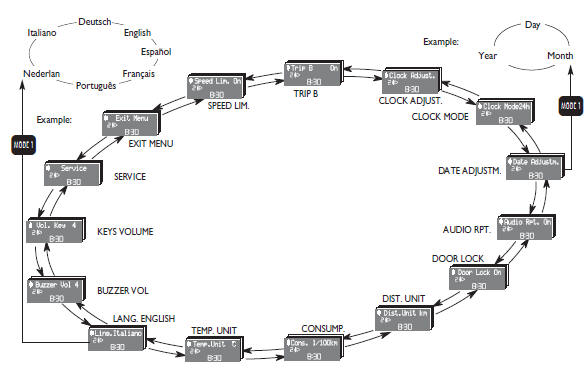
The menu comprises a series of functions arranged in a “circular fashion” which can be selected through buttons + and - for access to the different select operations and settings (see examples “Lang.” and “Date adjustm.” below); for further details, also refer to “Access to menu screen” on next page.


Other info:
Citroen C3. Scented air freshener
System permitting the diffusion of a fragrance
in the passenger compartment
in accordance with your requirements,
by means of the adjustment dial and the
various fragrance cartridges available ...
Chevrolet Sonic. Overview (AM-FM Radio)
1. FAV (Favorites)
Radio: Opens the favorites list.
2. /VOL (Power/Volume)
Turns the system on or off and adjusts the volume.
3. Buttons 1−6
Radio: Saves and selects favorit ...
Skoda Fabia. Tyre pressure monitor
Fig. 135 Button for setting the tyre inflation pressure control value
System settings
A system configuration must be run as follows after adjusting the tyre
pressure,
after changing one or mo ...
Manuals For Car Models
-
 Chevrolet Sonic
 -
 Citroen C3
 -
 Fiat Punto
 -
 Honda Fit
 -
 Mazda 2
 -
 Nissan Micra
 -
 Peugeot 208
 -
 Renault Clio
 -
 Seat Ibiza
 -
 Skoda Fabia
 - Honda Pilot
- Volkswagen ID4
- Toyota Prius
