
Fiat Punto: Reconfigurable multifunction display
Fiat Punto Owners Manual
The “Multifunction display” shows all the useful information necessary when driving, more particularly:
INFORMATION ON STANDARD SCREEN
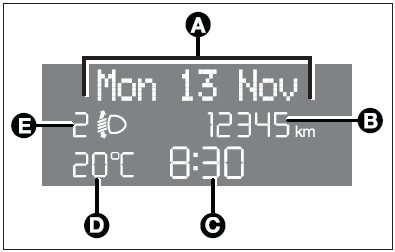
- Date (A).
- Total odometer (B).
- Clock (C).
- External temperature (D).
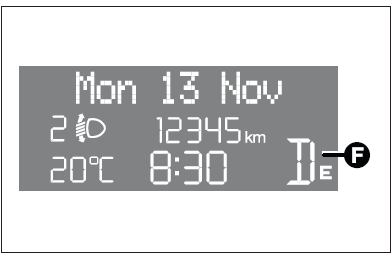
- Speedgear or Dualogic info display (where provided) (F).
With ignition key removed and front doors closed the display is off.
With ignition key removed, when opening one of the front doors the display comes on showing the clock and the odometer indication.
If the “Follow me home” function is on (see paragraph “Follow me home” in this section), the display will show the time the function is on (see section “Warning lights and messages”).
INFORMATION ABOUT CAR CONDITIONS (at event)
- Scheduled maintenance programme intervals.
- Trip computer information.
- Light adjustment of graphics/index/instrument cluster display and twozone climate control system (where provided).
- Display of failure/warning/function activation messages.
- Headlight aiming position display (with dipped beam headlights on) (E).
- Repetition of audio info.
There is also a menu enabling to perform the following adjustments and/or settings using the control buttons (see previous pages):
- Set-up menu
- Initial check
- Menu description
- Access to menu screen
- Speed limit
- Trip B ON/OFF (Trip B)
- Set clock
- Clock mode
- Set date (Date Adjustm.)
- Audio repetition (Audio Rpt.) (where provided)
- Speedlock (Door Lock) (where provided)
- “Distance unit” (Dist. Unit)
- “Consumption unit” (Consump.)
- “Temperature unit” (Temp. Unit)
- Language (Lang.)
- Buzzer volume (Buzzer Vol)
- Button volume (Keys Volume)
- Service (Service)
- Exit menu
- Trip computer
- Instrument panel, display and button lighting adjustment (light rheostat)


Other info:
Chevrolet Sonic. Using the Tire Sealant and Compressor Kit to Temporarily Seal and Inflate a
Punctured Tire
When using the tire sealant and compressor kit during cold temperatures, warm
the kit in a heated environment for five minutes. This will help to inflate the
tire faster.
If a tire goes flat, avo ...
Nissan Micra. Antenna
The antenna can be folded down toward the rear
of the vehicle 1 .
The antenna cannot be shortened but can be
folded down or removed. When you need to
remove the antenna, turn the antenna rod ...
Chevrolet Sonic. Seat Adjustment
Manual Seats
To adjust a manual seat:
1. Pull the handle at the front of the seat.
2. Slide the seat to the desired position and release the handle.
3. Try to move the seat back and forth to be ...
Manuals For Car Models
-
 Chevrolet Sonic
 -
 Citroen C3
 -
 Fiat Punto
 -
 Honda Fit
 -
 Mazda 2
 -
 Nissan Micra
 -
 Peugeot 208
 -
 Renault Clio
 -
 Seat Ibiza
 -
 Skoda Fabia
 - Honda Pilot
- Volkswagen ID4
- Toyota Prius
