
Fiat Punto: Speed limit
Fiat Punto Owners Manual
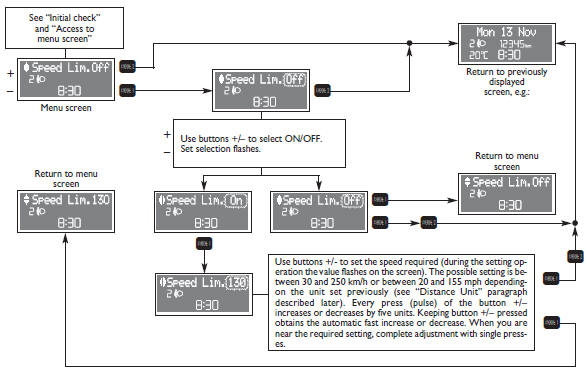
With this function it is possible to set the car speed limit which, if
exceeded, automatically sounds a buzzer and
makes the warning light  with the special message on the display (see “Warning
lights and messages” section) come
on to alert the driver. To set the speed limit, proceed as follows:


Other info:
Peugeot 208. Lighting dimmer control
System for the manual adjustment of the brightness of the instrument panel and
touch screen to suit the ambient light level.
Two buttons
With the headlamps on, press button B to increase the bri ...
Chevrolet Sonic. Windshield Wiper/Washer
Sedan
Hatchback
The windshield wiper/washer lever is on the right side of the steering column.
Move the lever to one of the following positions:
HI: Use for fast wipes.
LO: Use for slow wipes ...
Citroen C3. Window controls
System which opens or closes a window
manually or automatically. It is fi tted with
a system which provides protection if an
obstacle is detected on the one-touch
models and a deactivation sys ...
Manuals For Car Models
-
 Chevrolet Sonic
 -
 Citroen C3
 -
 Fiat Punto
 -
 Honda Fit
 -
 Mazda 2
 -
 Nissan Micra
 -
 Peugeot 208
 -
 Renault Clio
 -
 Seat Ibiza
 -
 Skoda Fabia
 - Honda Pilot
- Volkswagen ID4
- Toyota Prius
