

Nissan Micra: CD care and cleaning
Nissan Micra Owners Manual
Nissan Micra / Nissan Micra Owners Manual / Display screen, heater, air conditioner, audio and phone systems / Audio system / CD care and cleaning
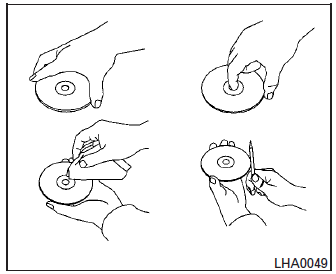
- Handle a CD by its edges. Do not bend the disc. Never touch the surface of the disc.
- Always place the discs in the storage case when they are not being used.
- To clean a disc, wipe the surface from the center to the outer edge using a clean, soft cloth. Do not wipe the disc using a circular motion.
- Do not use a conventional record cleaner or alcohol intended for industrial use.
- A new disc may be rough on the inner and outer edges. Remove the rough edges by rubbing the inner and outer edges with the side of a pen or pencil as illustrated.


Other info:
Ford Fiesta. Safety Belts
Principle of Operation
WARNINGS
Always drive and ride with your seat
back upright and the lap belt snug
and low across the hips.
To reduce the risk of injury, make
sure children sit where they can be ...
Seat Ibiza. Care of the vehicle interior
Cleaning plastic parts and the dash panel
– Use a clean, damp cloth to clean plastic parts and the dash panel. – If this
does not provide satisfactory results, use a special solvent-free plasti ...
Honda Fit. If the Charging System Indicator Comes On
■ Reasons for the indicator to come on
Comes on when the battery is not being charged.
■ What to do when the indicator comes on
Turn off the heating and cooling* system, rear defogg ...
Manuals For Car Models
-
 Chevrolet Sonic
 -
 Citroen C3
 -
 Fiat Punto
 -
 Honda Fit
 -
 Mazda 2
 -
 Nissan Micra
 -
 Peugeot 208
 -
 Renault Clio
 -
 Seat Ibiza
 -
 Skoda Fabia
 - Honda Pilot
- Volkswagen ID4
- Toyota Prius

© 2016-2026 Copyright www.b-auto.net 0.0135