Skoda Fabia: Fabia Scout, Fabia RS foglights
Skoda Fabia Owners Manual
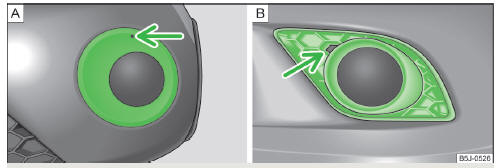
Fig. 159 Front bumper: Fabia Scout/Fabia RS
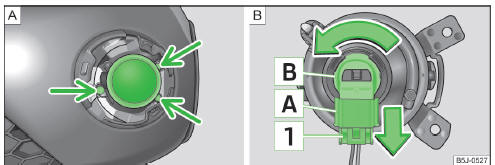
Fig. 160 Front bumper: Fog lights/fog lights: Replacing the light bulb
Removing the cap and fog light
- Insert the tool into the opening above the fog light » Fig. 159 - A (Fabia Scout) » page 158, Vehicle tool kit and remove the cover.
- Insert a finger into the opening next to the foglight » Fig. 159 - B (Fabia RS) and remove the cap.
- AUnscrew » page 158, Vehicle tool kitthe screws » Fig. 160 - with the screwdriver .
- Remove the fog lamp.
Changing light bulbs and installing fog lights
- Press the locking tab 1 » Fig. 160 on the connector A and remove the connector from the bulb holder B .
- Turn the bulb holder B and bulb in the direction of the arrow to the stop and remove.
- Replace the bulb, insert the bulb holder and new bulb and turn in the opposite direction to that of the arrow to the stop.
- Insert the plug A into the socket B .
- Retighten the screws and insert the cap. The cap must engage firmly.
Changing the licence plate light bulb
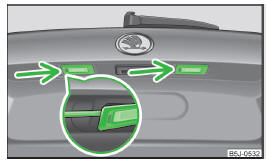
Fig. 161 Boot lid: Licence plate light
- Insert a flat screwdriver into the opening in the area of the arrow » Fig. 161 and carefully press towards the centre of the lamp; the lamp pops out slightly as you do this.
- Remove the lamp.
- Remove the faulty bulb from the holder and insert a new one.
- Replace the glass cover and push in until the stop.
Make sure that you install the glass cover in the correct position.


Other info:
Nissan Micra. Doors
When the doors are locked using one of the
following methods, the doors cannot be opened
using the inside or outside door handles. The
doors must be unlocked to open the doors.
WARNING
...
Fiat Punto. To close the bonnet
Proceed as follows:
hold the bonnet up with one hand and, with the
other, remove rod (C) from recess (D) replace it in
its clip;
lower the bonnet at approx. 20 cm from the engine
compartme ...
Mazda 2. Keys
WARNING
Do not leave the key in your vehicle
with children and keep them in a place
where your children will not fi nd or
play with them:
Leaving children in a vehicle with the
key is dangerous. ...
Manuals For Car Models
-
 Chevrolet Sonic
 -
 Citroen C3
 -
 Fiat Punto
 -
 Honda Fit
 -
 Mazda 2
 -
 Nissan Micra
 -
 Peugeot 208
 -
 Renault Clio
 -
 Seat Ibiza
 -
 Skoda Fabia
 - Honda Pilot
- Volkswagen ID4
- Toyota Prius
