

Chevrolet Sonic: USB Port
Chevrolet Sonic Owners Manual
The USB Port, if equipped, is in the storage area to the right of the infotainment system. See Overview (Radio with Touchscreen) or Overview (AM-FM Radio) or Overview (Radio with CD/USB).
Portable devices are controlled by using the menu system described in Operation.
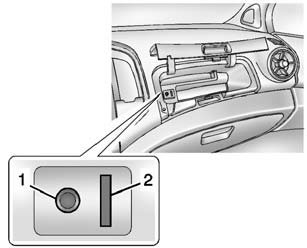
1. 3.5mm (1/8 in) Auxiliary Input Jack. See Auxiliary Devices.
2. USB Port.
- Radio without Touchscreen
- Connecting and Controlling an iPod®
- Connecting and Controlling a USB Drive
- Radio with Touchscreen
- Connecting a USB Storage Device or iPod/iPhone


Other info:
Chevrolet Sonic. Automatic Transmission Fluid
How to Check Automatic Transmission Fluid
It is not necessary to check the transmission fluid level. A transmission fluid
leak is the only reason for fluid loss. If a leak occurs, take the vehicle ...
Nissan Micra. Cleaning interior
Occasionally remove loose dust from the interior
trim, plastic parts and seats using a vacuum
cleaner or soft bristled brush. Wipe the vinyl and
leather surfaces with a clean, soft cloth dampened
...
Honda Fit. Opening and Closing the Windows
Opening/Closing the Power Windows
The power windows can be opened and closed when the ignition switch is in ON
, using the switches on the doors.
The driver’s side switches can be used to open
...
Manuals For Car Models
-
 Chevrolet Sonic
 -
 Citroen C3
 -
 Fiat Punto
 -
 Honda Fit
 -
 Mazda 2
 -
 Nissan Micra
 -
 Peugeot 208
 -
 Renault Clio
 -
 Seat Ibiza
 -
 Skoda Fabia
 - Honda Pilot
- Volkswagen ID4
- Toyota Prius
